virtIO
KVM下windows虚拟机使用virtio驱动
KVM下windows虚拟机默认disk使用的是Qemu IDE硬盘,网卡默认是rtl8139网卡。为了使kvm主机在相同的配置下,有更好的效率,可以将网卡和磁盘替换成virtio的驱动。
windows的virtio驱动主要包括网卡以及磁盘的驱动,主要有三种方式,第一种是已有windows的操作系统,需要更新驱动,第二种是是安装时加载virtio驱动,第三种是直接制作virtio驱动的iso系统镜像。
一:更新virtio驱动
驱动下载地址 https://fedoraproject.org/wiki/Windows_Virtio_Drivers,可以打开https://fedorapeople.org/groups/virt/virtio-win/direct-downloads/archive-virtio/下载不同版本的驱动
二:安装时加载virtio驱动
备注:xp/sp3使用virtio-win-0.1.96_x86.vfd的驱动,win7使用virtio-win-0.1.102.iso的驱动
1.xp/2k3
1.1 新建磁盘镜像 qemu-img create -f qcow2 /polydata/image/winxp_sp2_backup.qcow2 10G
1.2 准备驱动软盘(/tmp/virtio-win-0.1.96_x86.vfd)以及系统iso安装文件(/tmp/xpsp2_netkvm.iso,最好是已经集成virtio网卡驱动的镜像)
1.3 安装系统 virt-install --virt-type kvm --name winxp_sp2_backup --ram 512 --os-type=windows --os-variant=winxp --disk path=/polydata/image/winxp_sp2_backup.qcow2,format=qcow2,bus=virtio,cache=writeback --disk path=/tmp/virtio-win-0.1.96_x86.vfd,device=floppy --network bridge=br0,model=virtio --cdrom=/tmp/xpsp2_netkvm.iso --graphics vnc,listen=0.0.0.0 --noautoconsole
安装2k3系统时需要将--os-variant设置为win2k3
1.4 vnc连接,虚拟机起来后按F6,弹出如下界面
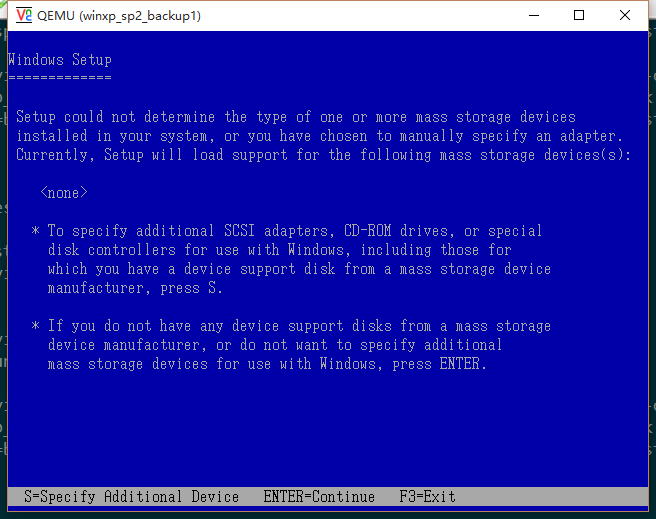
输入S,选择合适的scsi设备(virtio)

然后按两下回车就OK。剩下的就是一般的操作系统安装步骤,不再赘述。
安装完成效果如下
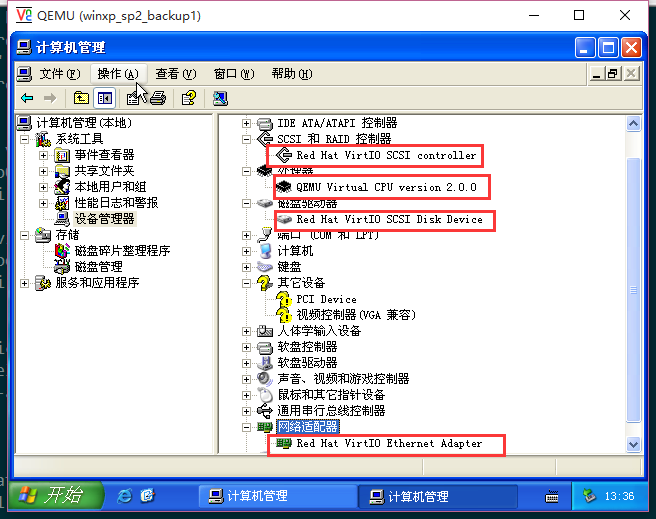
2.win7
1.1 新建磁盘镜像 qemu-img create -f qcow2 /polydata/image/win7_sp1_backup.qcow2 20G
1.2 准备驱动光盘(/tmp/virtio-win-0.1.102)以及系统iso安装文件(/tmp/win7sp1.iso)
1.3 安装系统 virt-install --virt-type kvm --name win7_sp1_backup --ram 1024 --os-type=windows --os-variant=win7 --disk path=/polydata/image/win7_sp1_backup.qcow2,bus=virtio,format=qcow2,cache=writeback --network bridge=br0,model=virtio --cdrom=/tmp/win7sp1.iso --disk path=/tmp/virtio-win-0.1-102.iso,device=cdrom --graphics vnc,listen=0.0.0.0 --noautoconsole
1.4 vnc连接,弹出如下安装界面
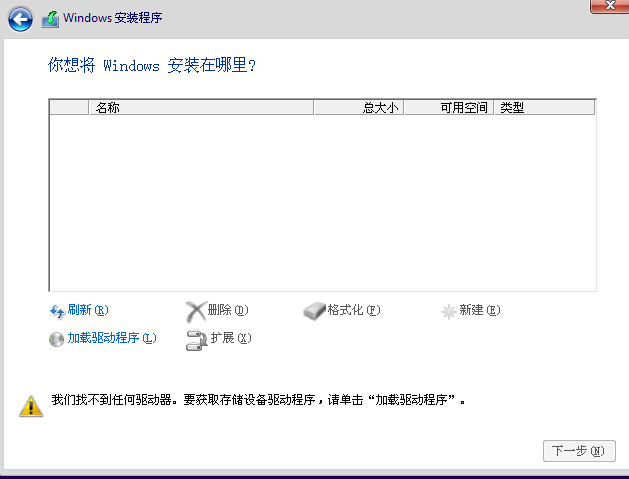
使用virtio接口的硬盘,我们必须加载virtio硬盘驱动。如果不加载该驱动windows installer会无法找到虚拟磁盘,点击加载驱动程序,浏览,选择virtio驱动光盘,找到viostor下对应的版本驱动,
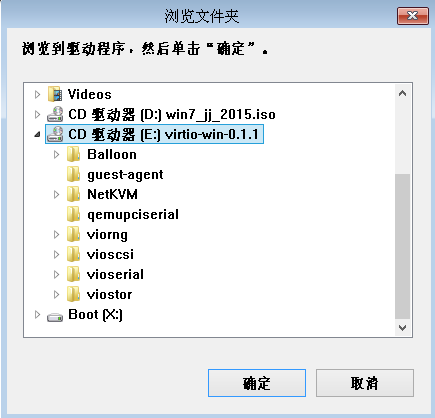

点击下一步,安装virtio磁盘驱动,随后多出来一块硬盘,同时安装网卡的virtio驱动

剩下的就是一般的操作系统安装步骤,不再赘述。效果如下:
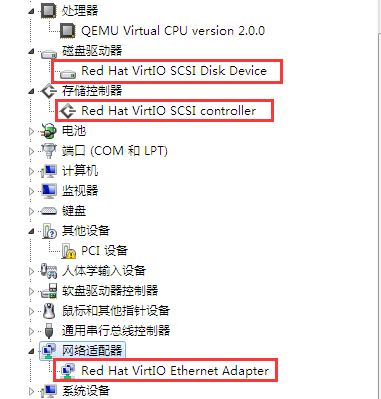
reference:http://www.mamicode.com/info-detail-126255.html
这是 Windows Server 2012r2驱动 加载的目录 磁盘 viostor\2k12r2\amd64 网卡 直接选光驱,包含子文件夹 PCI设备 直接选光驱,包含子文件夹 PCI简易通讯控制器 直接选光驱,包含子文件夹
三:制作virtio驱动的iso系统镜像
此方法主要使用nlite(xp/2k3)和dism(win7/20008…)工具,具体参见https://miefen.com/201405/how-to-install-virtio-drivers-for-windows
按照教程使用nlite添加磁盘和网卡的virtio驱动,但是安装的时候始终提示找不到scsi的驱动,驱动版本也是用的virtio-win-0.1.96.iso。但却有人制作成功过(用的是virtio-win-0.1-74.iso),本人尝试未果。
Windows VirtIO 驱动
Windows 驱动程序的源代码托管在 GIT Hub 的仓库中。匿名用户可以克隆该仓库
git clone git://github.com/virtio-win/kvm-guest-drivers-windows.git
二进制驱动程序
一些 Linux 发行版提供了二进制驱动程序,包括 WHQL 认证的驱动程序。
例如,可以在此处找到 Ubuntu 的二进制驱动程序。
64 位版本的 Windows Vista 及更新版本(目前包括 Windows Server 2008、Windows 7、Windows 8、Windows Server 2008 R2 和 Windows Server 2012)要求驱动程序经过数字签名才能加载。
如果您的发行版没有提供适用于 Windows 的二进制驱动程序,您可以使用 Fedora 项目的软件包。这些驱动程序经过数字签名,可以在 64 位版本的 Windows 上运行:
Fedora 上适用于 Windows 的最新 VirtIO 驱动程序 -> 使用 virtIO 驱动程序创建 Windows 虚拟机
适用于 Windows 64 位平台的代码签名驱动程序
驱动程序应针对 Windows 64 位平台进行签名。
以下是一些有关如何进行自签名和安装自签名驱动程序的链接:
Windows VirtIO Drivers
The source for the Windows drivers is hosted in a repository on GIT hub. Anonymous users can clone the repository
git clone git://github.com/virtio-win/kvm-guest-drivers-windows.git
Binary Drivers
Binary drivers are provided by some Linux distributions including WHQL Certified drivers.
For example the binary drivers for Ubuntu can be found here.
64-bit versions of Windows Vista and newer (this currently includes Windows Server 2008, Windows 7, Windows 8, Windows Server 2008 R2 and Windows Server 2012) require the drivers to be digitally signed to load.
If your distribution does not provide binary drivers for Windows, you can use the package from the Fedora Project. These drivers are digitally signed, and will work on 64-bit versions of Windows:
Latest VirtIO drivers for Windows from Fedora
Code signing drivers for the Windows 64bit platforms
Drivers should be signed for Windows 64bit platforms.
Here are some links how to self sign and install self signed drivers:
使用 virtIO 驱动程序创建 Windows 虚拟机
本页面已从 Fedora 项目 Wiki 转换而来,并已进行清理,以便发布到 Fedora 文档门户,但尚未进行技术准确性审核。这意味着此页面上的任何信息可能已过时或不准确。非常感谢您对技术准确性的审核。如果您愿意提供帮助,请参阅源码仓库中的README文件以获取相关说明。
本文档介绍如何获取在基于内核的虚拟机 (KVM) 上运行的 Windows 虚拟机的 virtIO 驱动程序和其他软件代理。virtIO是网络和磁盘设备驱动程序的虚拟化标准。
Fedora 无法提供 Windows virtIO 驱动程序,因为它们无法作为 Fedora 构建系统的一部分自动构建:构建 Windows virtIO 驱动程序的唯一方法是在运行 Windows 的计算机上。此外,提供预编译的源代码通常违反 Fedora 的政策。Microsoft 不提供 virtIO 驱动程序,您必须自行下载才能使 virtIO 驱动程序可用于在 Fedora 主机上运行的 Windows 虚拟机。
这些存储库中的驱动程序是根据GPLv2许可证授权的。
VirtIO-Win Repo 概述
您可以通过 RPM 软件包管理器 (RPM) 获取 yum|dnf 仓库,其中包含 virtio-win 软件包。您可以使用这些 RPM 将驱动程序二进制文件和代理安装程序安装到/usr/share主机的目录中。然后,您可以将这些文件与主机上运行的 Windows 虚拟机共享。
.repo 文件提供了两个不同的存储库:
- virtio-win-stable - 此仓库提供的 virtio-win 版本与最新 Red Hat Enterprise Linux 版本大致相同,这意味着这些版本已经过测试,被认为是稳定的。此仓库默认启用。
- virtio-win-latest - 此仓库提供最新的驱动程序版本。这些版本可能没有错误,也可能是开发质量问题,或者完全崩溃。买家自负。此仓库默认禁用。
Fedora VirtIO 驱动程序与 RHEL VirtIO 驱动程序
virtio-win-stable仓库中的 RPM与 Red Hat Enterprise Linux 附带的驱动程序版本相同。所有 Windows 二进制文件均基于 Red Hat 内部构建系统构建,并使用公开代码生成。有关 RPM 和仓库构建方式的更多详细信息,请参阅此仓库的 README 文件。
这些驱动程序已使用 Red Hat 的供应商签名进行加密签名。但是,它们未使用 Microsoft 的WHQL 签名进行签名。
由于Windows 驱动程序签名策略的签名要求,在虚拟机中启用安全启动时,某些版本的 Windows 将无法加载未经 Microsoft 签名的驱动程序。请参阅错误 #1844726。
过去,alt.fedoraproject.org 上发布的 .iso 文件与 Red Hat Enterprise Linux 附带的 .iso 布局不匹配。这种情况已于 2015 年 4 月得到解决。
当前 Fedora 的 RPM/ISO 目录结构与最新版 Red Hat Enterprise Linux 的目录结构完全一致。这样一来,用户和开发者就不会感觉到两个发行版之间的任何差异。
- 这些
.iso目录以上游驱动程序 git 树中的驱动程序代码目录命名。 - 在驱动程序目录下,
$winversion/$arch/目录命名是 Windows 约定。 - RPM 的布局很随意,因为它只包含目录
.vfd中的内容drivers/,而没有包含目录中的许多其他驱动程序.iso。这似乎是历史遗留问题,应该修复。
安装 Windows VirtIO 存储库
使用以下命令安装 repo 文件:
xxxxxxxxxx# wget https://fedorapeople.org/groups/virt/virtio-win/virtio-win.repo \-O /etc/yum.repos.d/virtio-win.repo
然后安装virtio-win包:
xxxxxxxxxx# dnf 安装 virtio-win
启用最新的 Windows VirtIO 存储库
默认情况下,virtio-win-latest存储库是禁用的,而virtio-win-stable存储库是启用的。
要使用 DNF启用virtio-win-latest repo:
xxxxxxxxxx# dnf --enablerepo=virtio-win-latest 升级 virtio-win
RPM 内容
virtio-win RPM 包包含以下文件:
/usr/share/virtio-win/*.iso- 包含所有驱动程序的 ISO CDROM。/usr/share/virtio-win/*.vfd- 安装 Windows XP 时使用的 VFD 软盘映像/usr/share/virtio-win/drivers- 提取的 VFD 驱动程序内容的副本/usr/share/guest-agent/*.msi- QEMU Guest Agent 32 位和 64 位 MSI 安装程序
ISO 内容
ISO 用于在 Windows 客户机中安装半虚拟驱动程序。RPMvirtio-win/*.iso中包含以下内容:
NetKVM/-Virtio 网络驱动程序viostor/- Virtio 块驱动程序vioscsi/- Virtio 小型计算机系统接口 (SCSI) 驱动程序viorng/- Virtio RNG 驱动程序vioser/- Virtio 串行驱动程序Balloon/- Virtio 内存气球驱动程序qxl/- 适用于 Windows 7 及更早版本的 QXL 图形驱动程序。(构建 virtio-win-0.1.103-1 及更高版本)qxldod/- 适用于 Windows 8 及更高版本的 QXL 图形驱动程序。(构建 virtio-win-0.1.103-2 及更高版本)pvpanic/- QEMU pvpanic设备驱动程序(构建 virtio-win-0.1.103-2 及更高版本)guest-agent/- QEMU Guest Agent 32 位和 64 位 MSI 安装程序qemupciserial/- QEMU PCI串行设备驱动程序*.vfd安装 Windows XP 时使用的 VFD 软盘映像
如果您之前使用过 alt.fedoraproject.org 的 ISO,请注意,当前 ISO 的文件布局与 Red Hat Enterprise Linux ISO 的布局不同。如果您需要旧 ISO 以实现向后兼容,可以在弃用 ISO 页面上找到它们。
直接下载
可直接下载.iso、.vfd和 qemu-ga 安装程序。
- 稳定的virtio-win iso
- 稳定的virtio-win x86 软盘
- 稳定的virtio-win amd64 软盘
- 最新的virtio-win iso
- 最新的virtio-win x86 软盘
- 最新的virtio-win amd64 软盘
- 最新的qemu-ga 文件
- 完整档案
- 变更日志
提交 Windows VirtIO 错误
提交错误时,请提供以下信息:
virtio-win 版本
主机发行版
qemu 版本
- 如果使用 libvirt:
sudo virsh dumpxml $vmname
- 如果使用 libvirt:
qemu 命令日志
- 如果使用 libvirt,可以在以下位置找到
/var/log/libvirt/qemu/$vmname.log
- 如果使用 libvirt,可以在以下位置找到
有关 RPM 或 yum|dnf 软件库的问题/评论,请发送至常规 Fedora virt邮件列表和 IRC频道。有关实际驱动程序的问题/评论,最好发送至上游qemu-devel或kvm邮件列表。
其他资源
- KVM Windows 客户机驱动程序上游代码:https://github.com/virtio-win/kvm-guest-drivers-windows
- QXL XDDM 驱动程序代码:http://cgit.freedesktop.org/spice/win32/qxl
- QXL WDDM 驱动程序代码:https://github.com/vrozenfe/qxl-dod
- gnome-boxes 用于自动安装驱动程序的树:https://zeenix.fedorapeople.org/drivers/
- Windows spice 代理 git 仓库:http://cgit.freedesktop.org/spice/win32/vd_agent
- Spice 来宾工具安装程序代码:http://cgit.freedesktop.org/~teuf/spice-nsis/
- spice-guest-tools下载:http://www.spice-space.org/download/binaries/spice-guest-tools/
- Fedora virtio-win 构建脚本:https://github.com/crobinso/virtio-win-pkg-scripts
Creating Windows virtual machines using virtIO drivers
| This page has been converted from the Fedora Project Wiki and cleaned up for publishing here on the Fedora Docs Portal, but it has not yet been reviewed for technical accuracy. This means any information on this page may be outdated or inaccurate. Reviews for technical accuracy are greatly appreciated. If you want to help, see the README file in the source repository for instructions. |
|---|
This document describes how to obtain virtIO drivers and additional software agents for Windows virtual machines running on kernel-based virtual machines (KVM). virtIO is a virtualization standard for network and disk device drivers.
Fedora cannot ship Windows virtIO drivers because they cannot be built automatically as part of Fedora’s build system: the only way to build Windows virtIO drivers is on a machine running Windows. In addition, shipping pre-compiled sources is generally against Fedora policies. Microsoft does not provide virtIO drivers, you must download them yourself in order to make virtIO drivers available for Windows VMs running on Fedora hosts.
The drivers in these repos are licensed under the GPLv2 license.
VirtIO-Win Repo Overview
There is a yum|dnf repo available via the RPM package manager (RPM) that ships virtio-win packages. You can use these RPMs to install driver binaries and agent installers into the /usr/share directory on your host machine. You can then share the bits with Windows VMs running on the host.
The .repo file provides two different repositories:
- virtio-win-stable - This repository provides builds of virtio-win that roughly correlate to what was shipped with the most recent Red Hat Enterprise Linux release, meaning these builds have undergone testing and are considered stable. This repo is enabled by default.
- virtio-win-latest - This repository provides the latest driver builds. The builds may be bug free, development quality, or completely broken. Caveat emptor. This repo is disabled by default.
Fedora VirtIO Drivers vs. RHEL VirtIO Drivers
The RPMs in the virtio-win-stable repository are the same driver builds as what is shipped with Red Hat Enterprise Linux. All the Windows binaries are from builds done on Red Hat’s internal build system, which are generated using publicly available code. For more details about how the RPM and repo are built, see the README for this repo.
The drivers are cryptographically signed with Red Hat’s vendor signature. However they are not signed with Microsoft’s WHQL signature.
| Due to the signing requirements of the Windows Driver Signing Policy, drivers which are not signed by Microsoft will not be loaded by some versions of Windows when Secure Boot is enabled in the virtual machine. See bug #1844726. |
|---|
| Historically the .iso files shipped on alt.fedoraproject.org did not match the layout of the .iso shipped with Red Hat Enterprise Linux. This changed in April 2015. |
|---|
The current Fedora RPM/ISO directory structure is laid out to mirror exactly the layout that is shipped with the latest release of Red Hat Enterprise Linux. This is so that users and developers don’t seen any differences between the two distros.
- The
.isodirectories are named after the driver code directories from the upstream driver git tree. - Below the driver directories, the
$winversion/$arch/directory naming is a Windows convention. - The RPM layout is arbitrary in that it ships the
.vfdcontent in thedrivers/dir, but not many of the other drivers from the.iso. This seems to be an historical oversight and should probably be fixed.
Installing the Windows VirtIO Repository
Install the repo file using the following command:
xxxxxxxxxx# wget https://fedorapeople.org/groups/virt/virtio-win/virtio-win.repo \-O /etc/yum.repos.d/virtio-win.repo
Then install the virtio-win package:
xxxxxxxxxx# dnf install virtio-win
Enabling the latest Windows VirtIO Repository
By default, the virtio-win-latest repository is disabled and virtio-win-stable repo is enabled.
To enable the virtio-win-latest repo with DNF:
xxxxxxxxxx# dnf --enablerepo=virtio-win-latest upgrade virtio-win
RPM contents
The virtio-win RPM package contains the following files:
/usr/share/virtio-win/*.iso- ISO CDROM containing all the drivers./usr/share/virtio-win/*.vfd- VFD floppy images for using during install of Windows XP/usr/share/virtio-win/drivers- Copy of the extracted VFD driver contents/usr/share/guest-agent/*.msi- QEMU Guest Agent 32bit and 64bit MSI installers
ISO contents
ISO is used to install paravirtual drivers in Windows guests. The virtio-win/*.iso included in the RPM contains the following bits:
NetKVM/- Virtio network driverviostor/- Virtio block drivervioscsi/- Virtio Small Computer System Interface (SCSI) driverviorng/- Virtio RNG drivervioser/- Virtio serial driverBalloon/- Virtio memory balloon driverqxl/- QXL graphics driver for Windows 7 and earlier. (build virtio-win-0.1.103-1 and later)qxldod/- QXL graphics driver for Windows 8 and later. (build virtio-win-0.1.103-2 and later)pvpanic/- QEMU pvpanic device driver (build virtio-win-0.1.103-2 and later)guest-agent/- QEMU Guest Agent 32bit and 64bit MSI installersqemupciserial/- QEMU PCI serial device driver*.vfdVFD floppy images for using during install of Windows XP
| If you previously used isos from alt.fedoraproject.org, note that the current isos have a different file layout that matches the layout of the Red Hat Enterprise Linux isos. If you need old isos for backwards compatiblity you can find them on the deprecated isos page. |
|---|
Direct downloads
Direct downloads are available for the .iso, .vfd, and qemu-ga installers.
- Stable virtio-win iso
- Stable virtio-win x86 floppy
- Stable virtio-win amd64 floppy
- Latest virtio-win iso
- Latest virtio-win x86 floppy
- Latest virtio-win amd64 floppy
- Latest qemu-ga files
- Full archive
- Changelog
Filing Windows VirtIO Bugs
Please file any bug reports in Bugzilla against https://bugzilla.redhat.com/enter_bug.cgi?product=Virtualization%20Tools&component=virtio-win.
When filing a bug, please provide the following information:
The virtio-win version
The host distro
The qemu version
- If using libvirt:
sudo virsh dumpxml $vmname
- If using libvirt:
The qemu command log
- If using libvirt this can be found at
/var/log/libvirt/qemu/$vmname.log
- If using libvirt this can be found at
Questions/Comments about the RPMs or the yum|dnf repos should be sent to the regular Fedora virt mailing list and IRC channels. Questions/Comments about the actual drivers are best send to the upstream qemu-devel or kvm mailing lists.
Additional resources
- KVM windows guest drivers upstream code: https://github.com/virtio-win/kvm-guest-drivers-windows
- QXL XDDM driver code: http://cgit.freedesktop.org/spice/win32/qxl
- QXL WDDM driver code: https://github.com/vrozenfe/qxl-dod
- Tree used by gnome-boxes for automatic driver installation: https://zeenix.fedorapeople.org/drivers/
- Windows spice agent git repo: http://cgit.freedesktop.org/spice/win32/vd_agent
- Spice guest tools installer code: http://cgit.freedesktop.org/~teuf/spice-nsis/
- spice-guest-tools downloads: http://www.spice-space.org/download/binaries/spice-guest-tools/
- Fedora virtio-win build scripts: https://github.com/crobinso/virtio-win-pkg-scripts :!context: