Ansible之Playbook
Playbook介绍
Playbook与ad-hoc相比,是一种完全不同的运用ansible的方式,类似与saltstack的state状态文件。ad-hoc无法持久使用,playbook可以持久使用。
playbook是由一个或多个play组成的列表,play的主要功能在于将事先归并为一组的主机装扮成事先通过ansible中的task定义好的角色。从根本上来讲,所谓的task无非是调用ansible的一个module。将多个play组织在一个playbook中,即可以让它们联合起来按事先编排的机制完成某一任务
Playbook核心元素
- Hosts 执行的远程主机列表
- Tasks 任务集
- Varniables 内置变量或自定义变量在playbook中调用
- Templates 模板,即使用模板语法的文件,比如配置文件等
- Handlers 和notity结合使用,由特定条件触发的操作,满足条件方才执行,否则不执行
- tags 标签,指定某条任务执行,用于选择运行playbook中的部分代码。
Playbook语法
playbook使用yaml语法格式,后缀可以是yaml,也可以是yml。
- 在单一一个
playbook文件中,可以连续三个连子号(---)区分多个play。还有选择性的连续三个点好(...)用来表示play的结尾,也可省略。 - 次行开始正常写
playbook的内容,一般都会写上描述该playbook的功能。 - 使用#号注释代码。
- 缩进必须统一,不能空格和
tab混用。 - 缩进的级别也必须是一致的,同样的缩进代表同样的级别,程序判别配置的级别是通过缩进结合换行实现的。
YAML文件内容和Linux系统大小写判断方式保持一致,是区分大小写的,k/v的值均需大小写敏感k/v的值可同行写也可以换行写。同行使用:分隔。v可以是个字符串,也可以是一个列表- 一个完整的代码块功能需要最少元素包括
name: task
一个简单的示例
x## 创建playbook文件[root@ansible ~]# cat playbook01.yml--- #固定格式- hosts: 192.168.1.31 #定义需要执行主机remote_user: root #远程用户vars: #定义变量http_port: 8088 #变量tasks: #定义一个任务的开始- name: create new file #定义任务的名称file: name=/tmp/playtest.txt state=touch #调用模块,具体要做的事情- name: create new useruser: name=test02 system=yes shell=/sbin/nologin- name: install packageyum: name=httpd- name: config httpdtemplate: src=./httpd.conf dest=/etc/httpd/conf/httpd.confnotify: #定义执行一个动作(action)让handlers来引用执行,与handlers配合使用- restart apache #notify要执行的动作,这里必须与handlers中的name定义内容一致- name: copy index.htmlcopy: src=/var/www/html/index.html dest=/var/www/html/index.html- name: start httpdservice: name=httpd state=startedhandlers: #处理器:更加tasks中notify定义的action触发执行相应的处理动作- name: restart apache #要与notify定义的内容相同service: name=httpd state=restarted #触发要执行的动作##测试页面准备[root@ansible ~]# echo "<h1>playbook test file</h1>" >>/var/www/html/index.html##配置文件准备[root@ansible ~]# cat httpd.conf |grep ^ListenListen {{ http_port }}##执行playbook, 第一次执行可以加-C选项,检查写的playbook是否ok[root@ansible ~]# ansible-playbook playbook01.ymlPLAY [192.168.1.31] *********************************************************************************************TASK [Gathering Facts] ******************************************************************************************ok: [192.168.1.31]TASK [create new file] ******************************************************************************************changed: [192.168.1.31]TASK [create new user] ******************************************************************************************changed: [192.168.1.31]TASK [install package] ******************************************************************************************changed: [192.168.1.31]TASK [config httpd] *********************************************************************************************changed: [192.168.1.31]TASK [copy index.html] ******************************************************************************************changed: [192.168.1.31]TASK [start httpd] **********************************************************************************************changed: [192.168.1.31]PLAY RECAP ******************************************************************************************************192.168.1.31 : ok=7 changed=6 unreachable=0 failed=0 skipped=0 rescued=0 ignored=0## 验证上面playbook执行的结果[root@ansible ~]# ansible 192.168.1.31 -m shell -a 'ls /tmp/playtest.txt && id test02'192.168.1.31 | CHANGED | rc=0 >>/tmp/playtest.txtuid=990(test02) gid=985(test02) 组=985(test02)[root@ansible ~]# curl 192.168.1.31:8088<h1>playbook test file</h1>
Playbook的运行方式
通过ansible-playbook命令运行
格式:ansible-playbook <filename.yml> ... [options]
xxxxxxxxxx[root@ansible PlayBook]# ansible-playbook -h##ansible-playbook常用选项:--check or -C #只检测可能会发生的改变,但不真正执行操作--list-hosts #列出运行任务的主机--list-tags #列出playbook文件中定义所有的tags--list-tasks #列出playbook文件中定义的所以任务集--limit #主机列表 只针对主机列表中的某个主机或者某个组执行-f #指定并发数,默认为5个-t #指定tags运行,运行某一个或者多个tags。(前提playbook中有定义tags)-v #显示过程 -vv -vvv更详细
Playbook中元素属性
主机与用户
在一个playbook开始时,最先定义的是要操作的主机和用户
xxxxxxxxxx---- hosts: 192.168.1.31remote_user: root
除了上面的定义外,还可以在某一个tasks中定义要执行该任务的远程用户
xxxxxxxxxxtasks:- name: run df -hremote_user: testshell: name=df -h
还可以定义使用sudo授权用户执行该任务
xxxxxxxxxxtasks:- name: run df -hsudo_user: testsudo: yesshell: name=df -h
tasks任务列表
每一个task必须有一个名称name,这样在运行playbook时,从其输出的任务执行信息中可以很清楚的辨别是属于哪一个task的,如果没有定义 name,action的值将会用作输出信息中标记特定的task。
每一个playbook中可以包含一个或者多个tasks任务列表,每一个tasks完成具体的一件事,(任务模块)比如创建一个用户或者安装一个软件等,在hosts中定义的主机或者主机组都将会执行这个被定义的tasks。
xxxxxxxxxxtasks:- name: create new filefile: path=/tmp/test01.txt state=touch- name: create new useruser: name=test001 state=present
Handlers与Notify
很多时候当我们某一个配置发生改变,我们需要重启服务,(比如httpd配置文件文件发生改变了)这时候就可以用到handlers和notify了;
(当发生改动时)notify actions会在playbook的每一个task结束时被触发,而且即使有多个不同task通知改动的发生,notify actions知会被触发一次;比如多个resources指出因为一个配置文件被改动,所以apache需要重启,但是重新启动的操作知会被执行一次。
xxxxxxxxxx[root@ansible ~]# cat httpd.yml##用于安装httpd并配置启动---- hosts: 192.168.1.31remote_user: roottasks:- name: install httpdyum: name=httpd state=installed- name: config httpdtemplate: src=/root/httpd.conf dest=/etc/httpd/conf/httpd.confnotify:- restart httpd- name: start httpdservice: name=httpd state=startedhandlers:- name: restart httpdservice: name=httpd state=restarted##这里只要对httpd.conf配置文件作出了修改,修改后需要重启生效,在tasks中定义了restart httpd这个action,然后在handlers中引用上面tasks中定义的notify。
Playbook中变量的使用
环境说明:这里配置了两个组,一个apache组和一个nginx组
xxxxxxxxxx[root@ansible PlayBook]# cat /etc/ansible/hosts[apache]192.168.1.36192.168.1.33[nginx]192.168.1.3[1:2]
命令行指定变量
执行playbook时候通过参数-e传入变量,这样传入的变量在整个playbook中都可以被调用,属于全局变量
xxxxxxxxxx[root@ansible PlayBook]# cat variables.yml---- hosts: allremote_user: roottasks:- name: install pkgyum: name={{ pkg }}##执行playbook 指定pkg[root@ansible PlayBook]# ansible-playbook -e "pkg=httpd" variables.yml
hosts文件中定义变量
在/etc/ansible/hosts文件中定义变量,可以针对每个主机定义不同的变量,也可以定义一个组的变量,然后直接在playbook中直接调用。注意,组中定义的变量没有单个主机中的优先级高。
xxxxxxxxxx## 编辑hosts文件定义变量[root@ansible PlayBook]# vim /etc/ansible/hosts[apache]192.168.1.36 webdir=/opt/test #定义单个主机的变量192.168.1.33[apache:vars] #定义整个组的统一变量webdir=/web/test[nginx]192.168.1.3[1:2][nginx:vars]webdir=/opt/web## 编辑playbook文件[root@ansible PlayBook]# cat variables.yml---- hosts: allremote_user: roottasks:- name: create webdirfile: name={{ webdir }} state=directory #引用变量## 执行playbook[root@ansible PlayBook]# ansible-playbook variables.yml
playbook文件中定义变量
编写playbook时,直接在里面定义变量,然后直接引用,可以定义多个变量;注意:如果在执行playbook时,又通过-e参数指定变量的值,那么会以-e参数指定的为准。
xxxxxxxxxx## 编辑playbook[root@ansible PlayBook]# cat variables.yml---- hosts: allremote_user: rootvars: #定义变量pkg: nginx #变量1dir: /tmp/test1 #变量2tasks:- name: install pkgyum: name={{ pkg }} state=installed #引用变量- name: create new dirfile: name={{ dir }} state=directory #引用变量## 执行playbook[root@ansible PlayBook]# ansible-playbook variables.yml## 如果执行时候又重新指定了变量的值,那么会已重新指定的为准[root@ansible PlayBook]# ansible-playbook -e "dir=/tmp/test2" variables.yml
调用setup模块获取变量
setup模块默认是获取主机信息的,有时候在playbook中需要用到,所以可以直接调用。常用的参数参考
xxxxxxxxxx## 编辑playbook文件[root@ansible PlayBook]# cat variables.yml---- hosts: allremote_user: roottasks:- name: create filefile: name={{ ansible_fqdn }}.log state=touch #引用setup中的ansible_fqdn## 执行playbook[root@ansible PlayBook]# ansible-playbook variables.yml
独立的变量YAML文件中定义
为了方便管理将所有的变量统一放在一个独立的变量YAML文件中,laybook文件直接引用文件调用变量即可。
xxxxxxxxxx## 定义存放变量的文件[root@ansible PlayBook]# cat var.ymlvar1: vsftpdvar2: httpd## 编写playbook[root@ansible PlayBook]# cat variables.yml---- hosts: allremote_user: rootvars_files: #引用变量文件- ./var.yml #指定变量文件的path(这里可以是绝对路径,也可以是相对路径)tasks:- name: install packageyum: name={{ var1 }} #引用变量- name: create filefile: name=/tmp/{{ var2 }}.log state=touch #引用变量## 执行playbook[root@ansible PlayBook]# ansible-playbook variables.yml
Playbook中标签的使用
一个playbook文件中,执行时如果想执行某一个任务,那么可以给每个任务集进行打标签,这样在执行的时候可以通过-t选择指定标签执行,还可以通过--skip-tags选择除了某个标签外全部执行等。
xxxxxxxxxx## 编辑playbook[root@ansible PlayBook]# cat httpd.yml---- hosts: 192.168.1.31remote_user: roottasks:- name: install httpdyum: name=httpd state=installedtags: inhttpd- name: start httpdservice: name=httpd state=startedtags: sthttpd- name: restart httpdservice: name=httpd state=restartedtags:- rshttpd- rs_httpd## 正常执行的结果[root@ansible PlayBook]# ansible-playbook httpd.ymlPLAY [192.168.1.31] **************************************************************************************************************************TASK [Gathering Facts] ***********************************************************************************************************************ok: [192.168.1.31]TASK [install httpd] *************************************************************************************************************************ok: [192.168.1.31]TASK [start httpd] ***************************************************************************************************************************ok: [192.168.1.31]TASK [restart httpd] *************************************************************************************************************************changed: [192.168.1.31]PLAY RECAP ***********************************************************************************************************************************192.168.1.31 : ok=4 changed=1 unreachable=0 failed=0 skipped=0 rescued=0 ignored=0
1)通过-t选项指定tags进行执行
xxxxxxxxxx## 通过-t指定tags名称,多个tags用逗号隔开[root@ansible PlayBook]# ansible-playbook -t rshttpd httpd.ymlPLAY [192.168.1.31] **************************************************************************************************************************TASK [Gathering Facts] ***********************************************************************************************************************ok: [192.168.1.31]TASK [restart httpd] *************************************************************************************************************************changed: [192.168.1.31]PLAY RECAP ***********************************************************************************************************************************192.168.1.31 : ok=2 changed=1 unreachable=0 failed=0 skipped=0 rescued=0 ignored=0
2)通过--skip-tags选项排除不执行的tags
xxxxxxxxxx[root@ansible PlayBook]# ansible-playbook --skip-tags inhttpd httpd.ymlPLAY [192.168.1.31] **************************************************************************************************************************TASK [Gathering Facts] ***********************************************************************************************************************ok: [192.168.1.31]TASK [start httpd] ***************************************************************************************************************************ok: [192.168.1.31]TASK [restart httpd] *************************************************************************************************************************changed: [192.168.1.31]PLAY RECAP ***********************************************************************************************************************************192.168.1.31 : ok=3 changed=1 unreachable=0 failed=0 skipped=0 rescued=0 ignored=0
Playbook中模板的使用
template模板为我们提供了动态配置服务,使用jinja2语言,里面支持多种条件判断、循环、逻辑运算、比较操作等。其实说白了也就是一个文件,和之前配置文件使用copy一样,只是使用copy,不能根据服务器配置不一样进行不同动态的配置。这样就不利于管理。
说明:
1、多数情况下都将template文件放在和playbook文件同级的templates目录下(手动创建),这样playbook文件中可以直接引用,会自动去找这个文件。如果放在别的地方,也可以通过绝对路径去指定。
2、模板文件后缀名为.j2。
示例:通过template安装httpd
1)playbook文件编写
xxxxxxxxxx[root@ansible PlayBook]# cat testtmp.yml##模板示例---- hosts: allremote_user: rootvars:- listen_port: 88 #定义变量tasks:- name: Install Httpdyum: name=httpd state=installed- name: Config Httpdtemplate: src=httpd.conf.j2 dest=/etc/httpd/conf/httpd.conf #使用模板notify: Restart Httpd- name: Start Httpdservice: name=httpd state=startedhandlers:- name: Restart Httpdservice: name=httpd state=restarted
2)模板文件准备,httpd配置文件准备,这里配置文件端口使用了变量
xxxxxxxxxx[root@ansible PlayBook]# cat templates/httpd.conf.j2 |grep ^ListenListen {{ listen_port }}
3)查看目录结构
xxxxxxxxxx## 目录结构[root@ansible PlayBook]# tree ..├── templates│ └── httpd.conf.j2└── testtmp.yml1 directory, 2 files
4)执行playbook,由于192.168.1.36那台机器是6的系统,模板文件里面的配置文件是7上面默认的httpd配置文件,httpd版本不一样(6默认版本为2.2.15,7默认版本为2.4.6),所以拷贝过去后启动报错。下面使用playbook中的判断语句进行处理;此处先略过
xxxxxxxxxx[root@ansible PlayBook]# ansible-playbook testtmp.ymlPLAY [all] ******************************************************************************************TASK [Gathering Facts] ******************************************************************************ok: [192.168.1.36]ok: [192.168.1.32]ok: [192.168.1.33]ok: [192.168.1.31]TASK [Install Httpd] ********************************************************************************ok: [192.168.1.36]ok: [192.168.1.33]ok: [192.168.1.32]ok: [192.168.1.31]TASK [Config Httpd] *********************************************************************************changed: [192.168.1.31]changed: [192.168.1.33]changed: [192.168.1.32]changed: [192.168.1.36]TASK [Start Httpd] **********************************************************************************fatal: [192.168.1.36]: FAILED! => {"changed": false, "msg": "httpd: Syntax error on line 56 of /etc/httpd/conf/httpd.conf: Include directory '/etc/httpd/conf.modules.d' not found\n"}changed: [192.168.1.32]changed: [192.168.1.33]changed: [192.168.1.31]RUNNING HANDLER [Restart Httpd] *********************************************************************changed: [192.168.1.31]changed: [192.168.1.32]changed: [192.168.1.33]PLAY RECAP ******************************************************************************************192.168.1.31 : ok=5 changed=3 unreachable=0 failed=0 skipped=0 rescued=0 ignored=0192.168.1.32 : ok=5 changed=3 unreachable=0 failed=0 skipped=0 rescued=0 ignored=0192.168.1.33 : ok=5 changed=3 unreachable=0 failed=0 skipped=0 rescued=0 ignored=0192.168.1.36 : ok=3 changed=1 unreachable=0 failed=1 skipped=0 rescued=0 ignored=0
template之when
条件测试:如果需要根据变量、facts或此前任务的执行结果来做为某task执行与否的前提时要用到条件测试,通过when语句执行,在task中使用jinja2的语法格式、
when语句:
在task后添加when子句即可使用条件测试;when语句支持jinja2表达式语法。
类似这样:
xxxxxxxxxxtasks:- command: /bin/falseregister: resultignore_errors: True- command: /bin/somethingwhen: result|failed- command: /bin/something_elsewhen: result|success- command: /bin/still/something_elsewhen: result|skipped
示例:通过when语句完善上面的httpd配置
1)准备两个配置文件,一个centos6系统httpd配置文件,一个centos7系统httpd配置文件。
xxxxxxxxxx[root@ansible PlayBook]# tree templates/templates/├── httpd6.conf.j2 #6系统2.2.15版本httpd配置文件└── httpd7.conf.j2 #7系统2.4.6版本httpd配置文件0 directories, 2 files
2)修改playbook文件,通过setup模块获取系统版本去判断。setup常用模块
xxxxxxxxxx[root@ansible PlayBook]# cat testtmp.yml##when示例---- hosts: allremote_user: rootvars:- listen_port: 88tasks:- name: Install Httpdyum: name=httpd state=installed- name: Config System6 Httpdtemplate: src=httpd6.conf.j2 dest=/etc/httpd/conf/httpd.confwhen: ansible_distribution_major_version == "6" #判断系统版本,为6便执行上面的template配置6的配置文件notify: Restart Httpd- name: Config System7 Httpdtemplate: src=httpd7.conf.j2 dest=/etc/httpd/conf/httpd.confwhen: ansible_distribution_major_version == "7" #判断系统版本,为7便执行上面的template配置7的配置文件notify: Restart Httpd- name: Start Httpdservice: name=httpd state=startedhandlers:- name: Restart Httpdservice: name=httpd state=restarted
3)执行playbook
xxxxxxxxxx[root@ansible PlayBook]# ansible-playbook testtmp.ymlPLAY [all] ******************************************************************************************TASK [Gathering Facts] ******************************************************************************ok: [192.168.1.31]ok: [192.168.1.32]ok: [192.168.1.33]ok: [192.168.1.36]TASK [Install Httpd] ********************************************************************************ok: [192.168.1.32]ok: [192.168.1.33]ok: [192.168.1.31]ok: [192.168.1.36]TASK [Config System6 Httpd] *************************************************************************skipping: [192.168.1.33]skipping: [192.168.1.31]skipping: [192.168.1.32]changed: [192.168.1.36]TASK [Config System7 Httpd] *************************************************************************skipping: [192.168.1.36]changed: [192.168.1.33]changed: [192.168.1.31]changed: [192.168.1.32]TASK [Start Httpd] **********************************************************************************ok: [192.168.1.36]ok: [192.168.1.31]ok: [192.168.1.32]ok: [192.168.1.33]RUNNING HANDLER [Restart Httpd] *********************************************************************changed: [192.168.1.33]changed: [192.168.1.31]changed: [192.168.1.32]changed: [192.168.1.36]PLAY RECAP ******************************************************************************************192.168.1.31 : ok=5 changed=2 unreachable=0 failed=0 skipped=1 rescued=0 ignored=0192.168.1.32 : ok=5 changed=2 unreachable=0 failed=0 skipped=1 rescued=0 ignored=0192.168.1.33 : ok=5 changed=2 unreachable=0 failed=0 skipped=1 rescued=0 ignored=0192.168.1.36 : ok=5 changed=2 unreachable=0 failed=0 skipped=1 rescued=0 ignored=0
template之with_items
with_items迭代,当有需要重复性执行的任务时,可以使用迭代机制。
对迭代项的引用,固定变量名为“item”,要在task中使用with_items给定要迭代的元素列表。
列表格式:
字符串
字典
示例1:通过with_items安装多个不同软件
编写playbook
xxxxxxxxxx[root@ansible PlayBook]# cat testwith.yml## 示例with_items---- hosts: allremote_user: roottasks:- name: Install Packageyum: name={{ item }} state=installed #引用item获取值with_items: #定义with_items- httpd- vsftpd- nginx
上面tasks写法等同于:
xxxxxxxxxx---- hosts: allremote_user: roottasks:- name: Install Httpdyum: name=httpd state=installed- name: Install Vsftpdyum: name=vsftpd state=installed- name: Install Nginxyum: name=nginx state=installed
示例2:通过嵌套子变量创建用户并加入不同的组
1)编写playbook
xxxxxxxxxx[root@ansible PlayBook]# cat testwith01.yml## 示例with_items嵌套子变量---- hosts: allremote_user: roottasks:- name: Create New Groupgroup: name={{ item }} state=presentwith_items:- group1- group2- group3- name: Create New Useruser: name={{ item.name }} group={{ item.group }} state=presentwith_items:- { name: 'user1', group: 'group1' }- { name: 'user2', group: 'group2' }- { name: 'user3', group: 'group3' }
2)执行playbook并验证
xxxxxxxxxx## 执行playbook[root@ansible PlayBook]# ansible-playbook testwith01.yml## 验证是否成功创建用户及组[root@ansible PlayBook]# ansible all -m shell -a 'tail -3 /etc/passwd'192.168.1.36 | CHANGED | rc=0 >>user1:x:500:500::/home/user1:/bin/bashuser2:x:501:501::/home/user2:/bin/bashuser3:x:502:502::/home/user3:/bin/bash192.168.1.32 | CHANGED | rc=0 >>user1:x:1001:1001::/home/user1:/bin/bashuser2:x:1002:1002::/home/user2:/bin/bashuser3:x:1003:1003::/home/user3:/bin/bash192.168.1.31 | CHANGED | rc=0 >>user1:x:1002:1003::/home/user1:/bin/bashuser2:x:1003:1004::/home/user2:/bin/bashuser3:x:1004:1005::/home/user3:/bin/bash192.168.1.33 | CHANGED | rc=0 >>user1:x:1001:1001::/home/user1:/bin/bashuser2:x:1002:1002::/home/user2:/bin/bashuser3:x:1003:1003::/home/user3:/bin/bash
template之for if
通过使用for,if可以更加灵活的生成配置文件等需求,还可以在里面根据各种条件进行判断,然后生成不同的配置文件、或者服务器配置相关等。
示例1
1)编写playbook
xxxxxxxxxx[root@ansible PlayBook]# cat testfor01.yml## template for 示例---- hosts: allremote_user: rootvars:nginx_vhost_port:- 81- 82- 83tasks:- name: Templage Nginx Configtemplate: src=nginx.conf.j2 dest=/tmp/nginx_test.conf
2)模板文件编写
xxxxxxxxxx## 循环playbook文件中定义的变量,依次赋值给port[root@ansible PlayBook]# cat templates/nginx.conf.j2{% for port in nginx_vhost_port %}server{listen: {{ port }};server_name: localhost;}{% endfor %}
3)执行playbook并查看生成结果
xxxxxxxxxx[root@ansible PlayBook]# ansible-playbook testfor01.yml## 去到一个节点看下生成的结果发现自动生成了三个虚拟主机[root@linux ~]# cat /tmp/nginx_test.confserver{listen: 81;server_name: localhost;}server{listen: 82;server_name: localhost;}server{listen: 83;server_name: localhost;}
示例2
1)编写playbook
xxxxxxxxxx[root@ansible PlayBook]# cat testfor02.yml## template for 示例---- hosts: allremote_user: rootvars:nginx_vhosts:- web1:listen: 8081server_name: "web1.example.com"root: "/var/www/nginx/web1"- web2:listen: 8082server_name: "web2.example.com"root: "/var/www/nginx/web2"- web3:listen: 8083server_name: "web3.example.com"root: "/var/www/nginx/web3"tasks:- name: Templage Nginx Configtemplate: src=nginx.conf.j2 dest=/tmp/nginx_vhost.conf
2)模板文件编写
xxxxxxxxxx[root@ansible PlayBook]# cat templates/nginx.conf.j2{% for vhost in nginx_vhosts %}server{listen: {{ vhost.listen }};server_name: {{ vhost.server_name }};root: {{ vhost.root }};}{% endfor %}
3)执行playbook并查看生成结果
xxxxxxxxxx[root@ansible PlayBook]# ansible-playbook testfor02.yml## 去到一个节点看下生成的结果发现自动生成了三个虚拟主机[root@linux ~]# cat /tmp/nginx_vhost.confserver{listen: 8081;server_name: web1.example.com;root: /var/www/nginx/web1;}server{listen: 8082;server_name: web2.example.com;root: /var/www/nginx/web2;}server{listen: 8083;server_name: web3.example.com;root: /var/www/nginx/web3;}
示例3
在for循环中再嵌套if判断,让生成的配置文件更加灵活
1)编写playbook
xxxxxxxxxx[root@ansible PlayBook]# cat testfor03.yml## template for 示例---- hosts: allremote_user: rootvars:nginx_vhosts:- web1:listen: 8081root: "/var/www/nginx/web1"- web2:server_name: "web2.example.com"root: "/var/www/nginx/web2"- web3:listen: 8083server_name: "web3.example.com"root: "/var/www/nginx/web3"tasks:- name: Templage Nginx Configtemplate: src=nginx.conf.j2 dest=/tmp/nginx_vhost.conf
2)模板文件编写
xxxxxxxxxx## 说明:这里添加了判断,如果listen没有定义的话,默认端口使用8888,如果server_name有定义,那么生成的配置文件中才有这一项。[root@ansible PlayBook]# cat templates/nginx.conf.j2{% for vhost in nginx_vhosts %}server{{% if vhost.listen is defined %}listen: {{ vhost.listen }};{% else %}listen: 8888;{% endif %}{% if vhost.server_name is defined %}server_name: {{ vhost.server_name }};{% endif %}root: {{ vhost.root }};}{% endfor %}
3)执行playbook并查看生成结果
xxxxxxxxxx[root@ansible PlayBook]# ansible-playbook testfor03.yml## 去到一个节点看下生成的结果发现自动生成了三个虚拟主机[root@linux ~]# cat /tmp/nginx_vhost.confserver{listen: 8081;root: /var/www/nginx/web1;}server{listen: 8888;server_name: web2.example.com;root: /var/www/nginx/web2;}server{listen: 8083;server_name: web3.example.com;root: /var/www/nginx/web3;}
Ansible之Roles
Roles介绍
ansible自1.2版本引入的新特性,用于层次性、结构化地组织playbook。roles能够根据层次型结构自动装载变量文件、tasks以及handlers等。要使用roles只需要在playbook中使用include指令引入即可。简单来讲,roles就是通过分别将变量、文件、任务、模板及处理器放置于单独的目录中,并可以便捷的include它们的一种机制。角色一般用于基于主机构建服务的场景中,但也可以是用于构建守护进程等场景中。主要使用场景代码复用度较高的情况下。
Roles目录结构
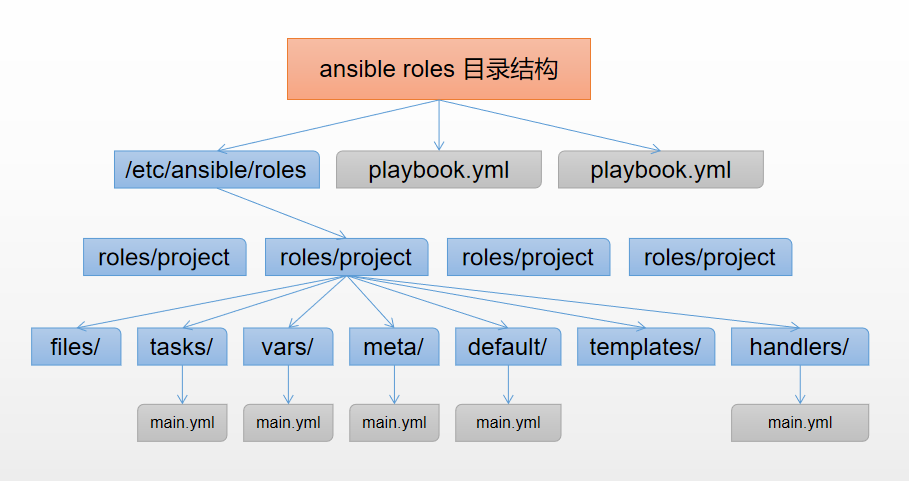
各目录含义解释
xxxxxxxxxxroles: <--所有的角色必须放在roles目录下,这个目录可以自定义位置,默认的位置在/etc/ansible/rolesproject: <---具体的角色项目名称,比如nginx、tomcat、phpfiles: <--用来存放由copy模块或script模块调用的文件。templates: <--用来存放jinjia2模板,template模块会自动在此目录中寻找jinjia2模板文件。tasks: <--此目录应当包含一个main.yml文件,用于定义此角色的任务列表,此文件可以使用include包含其它的位于此目录的task文件。main.ymlhandlers: <--此目录应当包含一个main.yml文件,用于定义此角色中触发条件时执行的动作。main.ymlvars: <--此目录应当包含一个main.yml文件,用于定义此角色用到的变量。main.ymldefaults: <--此目录应当包含一个main.yml文件,用于为当前角色设定默认变量。main.ymlmeta: <--此目录应当包含一个main.yml文件,用于定义此角色的特殊设定及其依赖关系。main.yml
Roles示例
通过ansible roles安装配置httpd服务,此处的roles使用默认的路径/etc/ansible/roles
1)创建目录
xxxxxxxxxx[root@ansible ~]# cd /etc/ansible/roles/## 创建需要用到的目录[root@ansible roles]# mkdir -p httpd/{handlers,tasks,templates,vars}[root@ansible roles]# cd httpd/[root@ansible httpd]# tree ..├── handlers├── tasks├── templates└── vars4 directories, 0 file
2)变量文件准备vars/main.yml
xxxxxxxxxx[root@ansible httpd]# vim vars/main.ymlPORT: 8088 #指定httpd监听的端口USERNAME: www #指定httpd运行用户GROUPNAME: www #指定httpd运行组
3)配置文件模板准备templates/httpd.conf.j2
xxxxxxxxxx## copy一个本地的配置文件放在templates/下并已j2为后缀[root@ansible httpd]# cp /etc/httpd/conf/httpd.conf templates/httpd.conf.j2## 进行一些修改,调用上面定义的变量[root@ansible httpd]# vim templates/httpd.conf.j2Listen {{ PORT }}User {{ USERNAME }}Group {{ GROUPNAME }}
4)任务剧本编写,创建用户、创建组、安装软件、配置、启动等
xxxxxxxxxx## 创建组的task[root@ansible httpd]# vim tasks/group.yml- name: Create a Startup Groupgroup: name=www gid=60 system=yes## 创建用户的task[root@ansible httpd]# vim tasks/user.yml- name: Create Startup Usersuser: name=www uid=60 system=yes shell=/sbin/nologin## 安装软件的task[root@ansible httpd]# vim tasks/install.yml- name: Install Package Httpdyum: name=httpd state=installed## 配置软件的task[root@ansible httpd]# vim tasks/config.yml- name: Copy Httpd Template Filetemplate: src=httpd.conf.j2 dest=/etc/httpd/conf/httpd.confnotify: Restart Httpd## 启动软件的task[root@ansible httpd]# vim tasks/start.yml- name: Start Httpd Serviceservice: name=httpd state=started enabled=yes## 编写main.yml,将上面的这些task引入进来[root@ansible httpd]# vim tasks/main.yml- include: group.yml- include: user.yml- include: install.yml- include: config.yml- include: start.ym
5)编写重启httpd的handlers,handlers/main.yml
xxxxxxxxxx[root@ansible httpd]# vim handlers/main.yml## 这里的名字需要和task中的notify保持一致- name: Restart Httpdservice: name=httpd state=restarted
6)编写主的httpd_roles.yml文件调用httpd角色
xxxxxxxxxx[root@ansible httpd]# cd ..[root@ansible roles]# vim httpd_roles.yml---- hosts: allremote_user: rootroles:- role: httpd #指定角色名称
7)整体的一个目录结构查看
xxxxxxxxxx[root@ansible roles]# tree ..├── httpd│ ├── handlers│ │ └── main.yml│ ├── tasks│ │ ├── config.yml│ │ ├── group.yml│ │ ├── install.yml│ │ ├── main.yml│ │ ├── start.yml│ │ └── user.yml│ ├── templates│ │ └── httpd.conf.j2│ └── vars│ └── main.yml└── httpd_roles.yml5 directories, 10 files
8)测试playbook语法是否正确
xxxxxxxxxx[root@ansible roles]# ansible-playbook -C httpd_roles.ymlPLAY [all] **************************************************************************************************TASK [Gathering Facts] **************************************************************************************ok: [192.168.1.33]ok: [192.168.1.32]ok: [192.168.1.31]ok: [192.168.1.36]TASK [httpd : Create a Startup Group] ***********************************************************************changed: [192.168.1.31]changed: [192.168.1.33]changed: [192.168.1.36]changed: [192.168.1.32]TASK [httpd : Create Startup Users] *************************************************************************changed: [192.168.1.33]changed: [192.168.1.32]changed: [192.168.1.31]changed: [192.168.1.36]TASK [httpd : Install Package Httpd] ************************************************************************changed: [192.168.1.33]changed: [192.168.1.32]changed: [192.168.1.31]changed: [192.168.1.36]TASK [httpd : Copy Httpd Template File] *********************************************************************changed: [192.168.1.33]changed: [192.168.1.36]changed: [192.168.1.32]changed: [192.168.1.31]TASK [httpd : Start Httpd Service] **************************************************************************changed: [192.168.1.36]changed: [192.168.1.31]changed: [192.168.1.32]changed: [192.168.1.33]RUNNING HANDLER [httpd : Restart Httpd] *********************************************************************changed: [192.168.1.36]changed: [192.168.1.33]changed: [192.168.1.32]changed: [192.168.1.31]PLAY RECAP **************************************************************************************************192.168.1.31 : ok=7 changed=6 unreachable=0 failed=0 skipped=0 rescued=0 ignored=0192.168.1.32 : ok=7 changed=6 unreachable=0 failed=0 skipped=0 rescued=0 ignored=0192.168.1.33 : ok=7 changed=6 unreachable=0 failed=0 skipped=0 rescued=0 ignored=0192.168.1.36 : ok=7 changed=6 unreachable=0 failed=0 skipped=0 rescued=0 ignored=0
9)上面的测试没有问题,正式执行playbook
xxxxxxxxxx[root@ansible roles]# ansible-playbook -C httpd_roles.ymlPLAY [all] **************************************************************************************************TASK [Gathering Facts] **************************************************************************************ok: [192.168.1.33]ok: [192.168.1.32]ok: [192.168.1.31]ok: [192.168.1.36]TASK [httpd : Create a Startup Group] ***********************************************************************changed: [192.168.1.31]changed: [192.168.1.33]changed: [192.168.1.36]changed: [192.168.1.32]TASK [httpd : Create Startup Users] *************************************************************************changed: [192.168.1.33]changed: [192.168.1.32]changed: [192.168.1.31]changed: [192.168.1.36]TASK [httpd : Install Package Httpd] ************************************************************************changed: [192.168.1.33]changed: [192.168.1.32]changed: [192.168.1.31]changed: [192.168.1.36]TASK [httpd : Copy Httpd Template File] *********************************************************************changed: [192.168.1.33]changed: [192.168.1.36]changed: [192.168.1.32]changed: [192.168.1.31]TASK [httpd : Start Httpd Service] **************************************************************************changed: [192.168.1.36]changed: [192.168.1.31]changed: [192.168.1.32]changed: [192.168.1.33]RUNNING HANDLER [httpd : Restart Httpd] *********************************************************************changed: [192.168.1.36]changed: [192.168.1.33]changed: [192.168.1.32]changed: [192.168.1.31]PLAY RECAP **************************************************************************************************192.168.1.31 : ok=7 changed=6 unreachable=0 failed=0 skipped=0 rescued=0 ignored=0192.168.1.32 : ok=7 changed=6 unreachable=0 failed=0 skipped=0 rescued=0 ignored=0192.168.1.33 : ok=7 changed=6 unreachable=0 failed=0 skipped=0 rescued=0 ignored=0192.168.1.36 : ok=7 changed=6 unreachable=0 failed=0 skipped=0 rescued=0 ignored=0[root@ansible roles]# ansible-playbook httpd_roles.ymlPLAY [all] **************************************************************************************************TASK [Gathering Facts] **************************************************************************************ok: [192.168.1.32]ok: [192.168.1.33]ok: [192.168.1.31]ok: [192.168.1.36]TASK [httpd : Create a Startup Group] ***********************************************************************changed: [192.168.1.32]changed: [192.168.1.31]changed: [192.168.1.33]changed: [192.168.1.36]TASK [httpd : Create Startup Users] *************************************************************************changed: [192.168.1.31]changed: [192.168.1.33]changed: [192.168.1.32]changed: [192.168.1.36]TASK [httpd : Install Package Httpd] ************************************************************************changed: [192.168.1.31]changed: [192.168.1.33]changed: [192.168.1.32]changed: [192.168.1.36]TASK [httpd : Copy Httpd Template File] *********************************************************************changed: [192.168.1.33]changed: [192.168.1.32]changed: [192.168.1.31]changed: [192.168.1.36]TASK [httpd : Start Httpd Service] **************************************************************************fatal: [192.168.1.36]: FAILED! => {"changed": false, "msg": "httpd: Syntax error on line 56 of /etc/httpd/conf/httpd.conf: Include directory '/etc/httpd/conf.modules.d' not found\n"}changed: [192.168.1.33]changed: [192.168.1.32]changed: [192.168.1.31]RUNNING HANDLER [httpd : Restart Httpd] *********************************************************************changed: [192.168.1.33]changed: [192.168.1.32]changed: [192.168.1.31]PLAY RECAP **************************************************************************************************192.168.1.31 : ok=7 changed=6 unreachable=0 failed=0 skipped=0 rescued=0 ignored=0192.168.1.32 : ok=7 changed=6 unreachable=0 failed=0 skipped=0 rescued=0 ignored=0192.168.1.33 : ok=7 changed=6 unreachable=0 failed=0 skipped=0 rescued=0 ignored=0192.168.1.36 : ok=5 changed=4 unreachable=0 failed=1 skipped=0 rescued=0 ignored=0
这里有看到报错,其原因是因为192.168.1.36这台机器是centos6系统,别的都是centos7系统,两个系统安装的httpd默认版本是不一样的,所以报错。如果需要优化。参考这里
ansible roles总结
1、编写任务(task)的时候,里面不需要写需要执行的主机,单纯的写某个任务是干什么的即可,装软件的就是装软件的,启动的就是启动的。单独做某一件事即可,最后通过main.yml将这些单独的任务安装执行顺序include进来即可,这样方便维护且一目了然。
2、定义变量时候直接安装k:v格式将变量写在vars/main.yml文件即可,然后task或者template直接调用即可,会自动去vars/main.yml文件里面去找。
3、定义handlers时候,直接在handlers/main.yml文件中写需要做什么事情即可,多可的话可以全部写在该文件里面,也可以像task那样分开来写,通过include引入一样的可以。在task调用notify时直接写与handlers名字对应即可(二者必须高度一直)。
4、模板文件一样放在templates目录下即可,task调用的时后直接写文件名字即可,会自动去到templates里面找。注意:如果是一个角色调用另外一个角色的单个task时后,那么task中如果有些模板或者文件,就得写绝对路径了。
ansible之template模块的用法
趁着最近在搞ansible,现在学习了一波template模块的用法:
1、目录结构
使用template模块在jinja2中引用变量,先来目录结构树
xxxxxxxxxx[root@master ansible]# tree.├── ansible.cfg├── hosts├── roles│ └── temp│ ├── tasks│ │ └── main.yaml│ ├── templates│ │ ├── test_if.j2│ │ └── test.j2│ └── vars│ └── main.yaml└── work_dir├── copy_configfile.retry└── copy_configfile.yaml
打开定义好的变量:
xxxxxxxxxx[root@master ansible]# cat roles/temp/vars/main.yamlmaster_ip: 192.168.101.14master_hostname: masternode1_ip: 192.168.101.15node1_hostname: node1
打开hosts文件查看节点信息:
xxxxxxxxxx[root@master ansible]# egrep -v "^#|^$" hosts[nodes]192.168.101.14192.168.101.15
现在通过定义好的变量在templates目录下创建j2文件:
xxxxxxxxxx[root@master ansible]# cat roles/temp/templates/test.j2ExecStart=/usr/local/bin/etcd --name {{ master_hostname }} --initial-advertise-peer-urls http://{{ master_ip }}:2380
查看tasks主任务定义:
xxxxxxxxxx[root@master ansible]# cat roles/temp/tasks/main.yaml- name: copy configfile to nodestemplate:src: test.j2dest: /tmp/test.conf
查看工作目录下面的执行yaml:
xxxxxxxxxx[root@master ansible]# cat work_dir/copy_configfile.yaml- hosts: nodesremote_user: rootroles:- temp
在tasks目录下面的main.yaml定义使用了template模块,调用templates目录下面的test.j2文件
执行:
xxxxxxxxxx[root@master ansible]# ansible-playbook work_dir/copy_configfile.yaml
然后在两个节点查看:
xxxxxxxxxx[root@master ~]# cat /tmp/test.confExecStart=/usr/local/bin/etcd --name master --initial-advertise-peer-urls http://192.168.101.14:2380
xxxxxxxxxx[root@node1 ~]# cat /tmp/test.confExecStart=/usr/local/bin/etcd --name master --initial-advertise-peer-urls http://192.168.101.14:2380
可以看见在各个节点的tem目录下面的文件都用变量替换了
2、if控制
使用template模块调用的j2文件使用{% if %} {% endif %}进行控制:
xxxxxxxxxx[root@master ansible]# cat roles/temp/templates/test_if.j2{% if ansible_hostname == master_hostname %}ExecStart=/usr/local/bin/etcd --name {{ master_hostname }} --initial-advertise-peer-urls http://{{ master_ip }}:2380{% elif ansible_hostname == node1_hostname %}ExecStart=/usr/local/bin/etcd --name {{ node1_hostname }} --initial-advertise-peer-urls http://{{ node1_ip }}:2380{% endif %}
在上面中使用if进行了判断,如果ansible_hostname变量与定义的master_hostname变量值相等,那么将此文件copy到节点上就使用条件1,而过不满足条件1那么执行条件2
ansible_hostname这个变量是setup模块中的值,是节点的固定值
xxxxxxxxxx[root@master ~]# ansible all -m setup -a "filter=ansible_hostname"192.168.101.15 | SUCCESS => {"ansible_facts": {"ansible_hostname": "node1"},"changed": false,"failed": false}192.168.101.14 | SUCCESS => {"ansible_facts": {"ansible_hostname": "master"},"changed": false,"failed": false}
现在查看tasks下面的文件:
xxxxxxxxxx[root@master ansible]# cat roles/temp/tasks/main.yaml- name: copy configfile to nodestemplate:src: test_if.j2dest: /tmp/test.conf
将上面的test.j2改为了if条件的j2,然后执行:
xxxxxxxxxx[root@master ansible]# ansible-playbook work_dir/copy_configfile.yaml
查看各节点生成的文件内容:
xxxxxxxxxx[root@master ~]# cat /tmp/test.confExecStart=/usr/local/bin/etcd --name master --initial-advertise-peer-urls http://192.168.101.14:2380
xxxxxxxxxx[root@node1 ~]# cat /tmp/test.confExecStart=/usr/local/bin/etcd --name node1 --initial-advertise-peer-urls http://192.168.101.15:2380
可以看见生成的文件内容不一样,于是这样就可以将节点的不同内容进行分离开了
当然还可以使用另外的方式隔离节点的不同:
xxxxxxxxxxExecStart=/usr/local/bin/etcd --name {{ ansible_hostname }} --initial-advertise-peer-urls http://{{ ansible_ens33.ipv4.address }}:2380
因为各个节点的ansible_hostname和ip都是固定的所以也可以根据上面进行区分不同(不过这种方式限制了一定的范围)
3、for循环
使用template模块调用j2文件使用for循环:
创建jinja关于for的文件:
xxxxxxxxxx[root@master ansible]# cat roles/temp/templates/test_for.j2{% for i in range(1,10) %}test{{ i }}{% endfor %}
xxxxxxxxxx[root@master ansible]# cat roles/temp/tasks/main.yaml- name: copy configfile to nodestemplate:src: test_for.j2dest: /tmp/test.conf
执行该角色:
xxxxxxxxxx[root@master ansible]# ansible-playbook work_dir/copy_configfile.yaml
验证两节点的文件内容:
xxxxxxxxxx[root@master ~]# cat /tmp/test.conftest1test2test3test4test5test6test7test8test9
xxxxxxxxxx[root@node1 ~]# cat /tmp/test.conftest1test2test3test4test5test6test7test8test9
4、default默认值
使用default()默认值
当我们定义了变量的值时,采用变量的值,当我们没有定义变量的值时,那么使用默认给定的值:
首先查看定义的变量:
xxxxxxxxxx[root@master ansible]# cat roles/temp/vars/main.yamlmaster_ip: 192.168.101.14master_hostname: masternode1_ip: 192.168.101.15node1_hostname: node1
然后查看jinja2的文件:
xxxxxxxxxx[root@master ansible]# cat roles/temp/templates/test_default.j2Listen: {{ server_port|default(80) }}
可以看见并没有定义server_port这个变量
查看tasks文件:
xxxxxxxxxx[root@master ansible]# cat roles/temp/tasks/main.yaml- name: copy configfile to nodestemplate:src: test_default.j2dest: /tmp/test.conf
执行完成后,查看文件内容:
xxxxxxxxxx[root@master ~]# cat /tmp/test.confListen: 80
现在向vars/main.yaml中定义server_port变量,并给定值:
xxxxxxxxxx[root@master ansible]# cat roles/temp/vars/main.yamlmaster_ip: 192.168.101.14master_hostname: masternode1_ip: 192.168.101.15node1_hostname: node1server_port: 8080
再次执行,然后查看文件内容:
xxxxxxxxxx[root@master ~]# cat /tmp/test.confListen: 8080
可以看见使用了定义的值
控制playbook执行:策略等
设置并发数量 forks
如果您有可用的处理能力并希望使用更多并发,您可以在 中设置数量ansible.cfg:
xxxxxxxxxx[defaults]forks = 30
或者在命令行上传递它:ansible-playbook -f 30 my_playbook.yml。
使用关键字控制执行 除了策略之外,还有几个关键字也会影响游戏执行。您可以使用 设置一次要管理的主机数量、百分比或数量列表serial。在开始下一批主机之前,Ansible 在指定数量或百分比的主机上完成播放。您可以使用 限制分配给块或任务的工人数量throttle。您可以控制 Ansible 如何选择组中的下一个主机来执行order。您可以使用run_once. 这些关键字不是策略。它们是应用于游戏、块或任务的指令或选项。
设置批量大小 serial
默认情况下,Ansible 针对您在每次播放的字段中设置的模式中的所有主机并行运行hosts:。如果您只想一次管理几台机器,例如在滚动更新期间,您可以使用serial关键字定义 Ansible 一次应管理多少台主机:
xxxxxxxxxx---- name: test playhosts: webserversserial: 3gather_facts: Falsetasks:- name: first taskcommand: hostname- name: second taskcommand: hostname
在上面的例子中,如果我们在 'webservers' 组中有 6 台主机,Ansible 将在移动到接下来的 3 台主机之前在其中 3 台主机上完全执行播放(两个任务):
xxxxxxxxxxPLAY [webservers] ****************************************TASK [first task] ****************************************changed: [web3]changed: [web2]changed: [web1]TASK [second task] ***************************************changed: [web1]changed: [web2]changed: [web3]PLAY [webservers] ****************************************TASK [first task] ****************************************changed: [web4]changed: [web5]changed: [web6]TASK [second task] ***************************************changed: [web4]changed: [web5]changed: [web6]PLAY RECAP ***********************************************web1 : ok=2 changed=2 unreachable=0 failed=0web2 : ok=2 changed=2 unreachable=0 failed=0web3 : ok=2 changed=2 unreachable=0 failed=0web4 : ok=2 changed=2 unreachable=0 failed=0web5 : ok=2 changed=2 unreachable=0 failed=0web6 : ok=2 changed=2 unreachable=0 failed=0
Note 使用 serial 设置批大小会将 Ansible 故障的范围更改为批大小,而不是整个主机列表。可以使用ignore_unreachable或max_fail_percentage来修改此行为。
您还可以使用serial关键字指定百分比。Ansible 将百分比应用于一次播放中的主机总数以确定每次传递的主机数:
xxxxxxxxxx---- name: test playhosts: webserversserial: "30%"
如果主机数不等分为传递数,则最终传递包含余数。在此示例中,如果 webservers 组中有 20 台主机,则第一批将包含 6 个主机,第二批将包含 6 个主机,第三批将包含 6 个主机,最后一批将包含 2 个主机。
您还可以将批量大小指定为列表。例如:
xxxxxxxxxx---- name: test playhosts: webserversserial:- 1- 5- 10
在上面的示例中,第一批将包含单个主机,下一个将包含 5 个主机,并且(如果还有剩余的主机),接下来的每个批次将包含 10 个主机或所有剩余的主机,如果少于 10 个主机留下了。
您可以按百分比列出多个批次大小:
xxxxxxxxxx---- name: test playhosts: webserversserial:- "10%"- "20%"- "100%"
您还可以混合和匹配这些值:
xxxxxxxxxx---- name: test playhosts: webserversserial:- 1- 5- "20%"
Note 无论百分比有多小,每次通过的主机数将始终为 1 或更多。
限制执行 throttle
该throttle关键字限制了工人的特定任务的数量。它可以在块和任务级别进行设置。使用throttle限制,可能是CPU密集型或相互作用与限速API任务:
xxxxxxxxxxtasks:- command: /path/to/cpu_intensive_commandthrottle: 1
如果您已经限制了分叉的数量或并行执行的机器数量,您可以使用 减少工作线程的数量throttle,但不能增加它。换句话说,要产生效果,如果您将它们一起使用,您的throttle设置必须低于您的forks或serial设置。
基于 inventory 的订单执行
order 关键字控制主机的运行顺序。order 的可能值为:
inventory: (默认)inventory为所请求的选择提供的订单(请参阅下面的注释)
reverse_inventory: 与上面相同,但反转返回的列表
sorted: 按名称的字母顺序排序
reverse_sorted: 按名称反向字母顺序排序
shuffle: 每次运行随机排序
Note “inventory”顺序不等于在清单源文件中定义主机/组的顺序,而是“从编译的清单返回选择的顺序”。这是一个向后兼容的选项,虽然可重现,但通常不可预测。由于库存的性质、主机模式、限制、库存插件以及允许多个来源的能力,几乎不可能返回这样的订单。对于简单情况,这可能恰好与文件定义顺序匹配,但不能保证。